¶ Create new financial bookyear
Before orders can be created for the new year, the financial year has to be created first.
How to create a new financial bookyear you can read in the article on financial years:
¶ Holidays
Every year the holidays have to be generated. How to configure and generate holidays you can read in our article on holidays:
¶ Rate increase
In the screen tariffgroups screen there is an action to easily increase tariffs with a percentage.
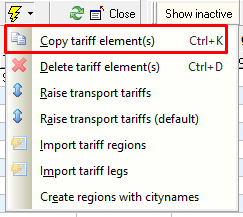
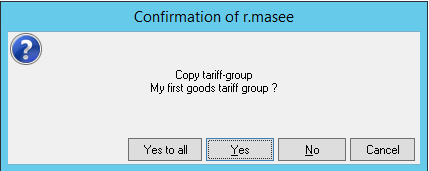
- Copy the tariff element (in this case the tariff period) with CTRL + K.
Click: ‘Yes to all’.
All underlying regions, routes and scales are copied to the new tariff group.
This is important, because this way the old tariffs are kept intact and the new tariff can be prepared well in advance.
2. Enter the date on which the tariff will take effect.
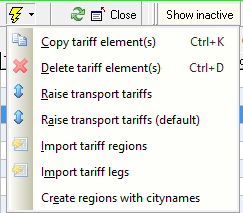
3. Select the action Raise transport tariffs.
When the tariffs are entered on the Defaults tab, then choose Raise transport tariffs (default)
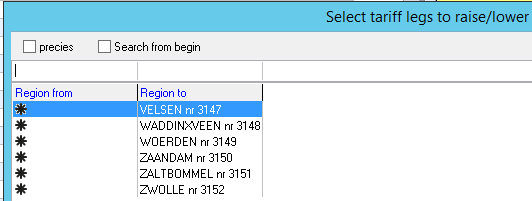
4. Select the routes voor which the tariff should be raised. All routes can be selected with Ctrl + A
5. Enter the percentage with which the tariffs should be raised
6. The system will ask if the maut and fuel tarrifs should be raised. Enter Yes or No here
7. Enter the amount of decimals to which the tariffs should be rounded. This way it is possible to get new tariffs that are rounded to the entire euro or one or two decimal places
8. The system will give an extra warning. After clicking Yes the tariffs are changed, based on the entered percentage and rounding
¶ Changing the invoice number
Some companies want to start a new invoice numbering in the new year.
Only one invoice counter can be used per invoice group, which must then be converted after the last invoice of the past year has been posted.
The invoice counter is recorded on the company screen on the Invoice groups tab, Groupitem properties tab and then the Invoice counter field:

The invoice counter can be adjusted in the Counters screen.
Find the invoice counter (in the screenshot above it is 29 - Verkoopfacturen) and enter the first number to be used in the new year:
In the example above, the next invoice will have number 2958.
This number can be adjusted manually.
¶ New administration financial software
With some financial software, it is necessary to adjust settings in Transpas when a new administration is created.
A lot of our customers use the financial software AccountView. This is one of the software suites where an adjustment in Transpas is necessary, when a new administration is created for the new year.
For Transpas Enterprise:
- Go to the Company screen
- Go to the tab sheet Financial
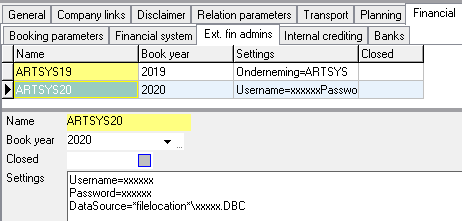
- Go to the tab sheet Ext. fin. adminstrations
Please note: this tab is not always visible, because some financial packages do not use it.
- Create a new line on this tab
- In the Name field, fill in the name of the new administration
- Fill the new book year in the field Book year
- In the Settings field, copy the settings from the previous year.
Depending on the financial software the settings can differ: For AccountView Web for instance it is not necessary to fill in a Username, password and DBC-code. Look at the previous year to see how these settings are filled there.
The adjustment that is important for AccountView specifically, is the adjustment of the value after Datasource, the so called DBC-code.
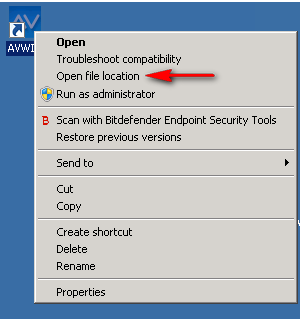
To find the correct DBC-code perform the following actions:- Right-click on the shortcut of AccountView
- Choose Open file location
- Find and open the folder of the new administration. This will have the same name as the administration
- Open this folder
- Search for the DBC-file here
- Replace the DBC-code in the copied settings with the DBC-code you have just found.
¶ Create new salary period
For our customers that work with the Time administration module, it is important to also create a new salary period.
How to do this is explained in this article:
¶ Transpas CS
For Transpas CS there are multiple possibilities to create a new bookyear. Do you have to create a new financial bookyear and are you not sure what needs to be done, please contact our support.