¶ Toll surcharges
As of 1 July 2026, the Dutch truck toll system will apply to freight traffic on designated roads in the Netherlands. To make it easy and predictable to pass these costs on to customers, Transpas provides functionality that automatically calculates toll surcharges based on the number of toll kilometres per country.
A key principle of this functionality is that the calculation is not dependent on the actual execution of the transport. The final surcharge is therefore not affected by the route that was driven or the vehicle that was used. This ensures that the applicable surcharge remains predictable in advance.
¶ Availability
This functionality is available in Transpas Enterprise from the 5 June 2026 update onwards. If an environment was last updated before this date, an update must first be performed.
You can send an update request to our helpdesk.
Request an update
The following screens have been added as part of this enhancement:
- Toll surcharge groups
- Toll surcharge rulesets
These screens are automatically authorized for user groups that already have access to the Surcharges screen.
¶ Preparation
The calculated toll surcharge is created as an additional cost line. Per company and per country, it can be configured which additional cost type should be used. This makes it possible, for example, to post toll surcharges for different countries to separate general ledger accounts.
An additional tab is available in the Company screen for this purpose.
General tab > Country Settings tab

Before you can enter the Toll extracostskind you have to create the Extracostskind first in the screen Extra costkinds.
¶ Toll Kilometres per Country
The surcharge is calculated per country and is based on the registered toll distance for that country. If no toll kilometres are available for a country, no toll surcharge will be created for that country.
For the Dutch truck toll system, it is required that PTV Developer is activated as the routing provider. xServer does not return Dutch toll kilometres. This setting can be found in the Company screen > General tab > Route Calculation section.
The registered distances per country can be viewed via:
Transport Order screen > General tab → Distances per Country tab

Distances per country are automatically generated during route calculation. No separate setting is required.
¶ Toll Surcharge Groups
The surcharge rates are defined within a toll surcharge group.
Within a toll surcharge group, scales can be created for different units or unit kinds. The unit on which the surcharge is ultimately based depends on the Tariff selection setting.
Available options are:
- First Match
- Cheapest
- Most Expensive
For example, a ton/km rate scale can be created, as well as a pallet-based rate scale. For a shipment containing both weight and pallets, the system determines which option is the cheapest or most expensive.
¶ Price Type
The Price Type field determines the type of pricing used. Available options are:
| Price Type | Calculation |
|---|---|
| Quantity/km Price | Quantity = toll kilometres × quantity of the selected unit |
| Quantity Price | Quantity = quantity of the selected unit |
| Kilometer Price | Quantity = number of toll kilometres |
| Fixed Price | Quantity is always 1 |
The Unit field next to the price type can be optionally used to define the unit that will ultimately be displayed on the extra cost line.
Example: Ton/km Price

Example: Pallet Price per Distance Range

Example: Loading Metres/km

¶ Assignment of a Toll Surcharge Group
A toll surcharge group can be assigned to a company or customer in combination with a country and an effective date. As usual, settings defined for a customer (per country) take precedence over settings defined at the company level.
¶ Company-wide Assignment
Company screen > Transport tab > Toll surcharges tab

¶ Customer-specific assignment
Financial Relations screen > Transport tab > Toll Surcharges tab
In the example below, a toll surcharge ruleset has been configured for the Dutch toll. In addition, the Danish toll charges has been explicitly disabled from 1 January 2025.

¶ Toll Surcharge Rule
When a fixed assignment of a toll surcharge group does not provide sufficient flexibility, a toll surcharge ruleset can be used.
Within a toll surcharge ruleset, toll surcharge groups can be assigned automatically based on various conditions.

¶ Result
After calculation, additional cost lines are automatically created for countries for which toll kilometres have been registered. The description of the cost line displays both the quantity used and the number of toll kilometres on which the calculation is based.

¶ Additions and improvements to the functionality
Based on feedback from practice, the functionality surrounding toll surcharge groups has been further expanded and improved. These additions provide more options for configuring toll surcharges flexibly and better aligning them with the desired workflows.
The most important additions and improvements are listed below by release date.
¶ Available from 02-07-2026
| Addition | Description |
|---|---|
| Description method | This selection field determines how the description on the additional cost line is constructed. |
| Rounding method | Three different rounding methods are available. |
| Minimum and maximum | A minimum and maximum amount can be set under the rate tiers for the rate to be assigned to the toll surcharge. |
| N/A to all-in price | Under the Parameters tab, you can specify that the toll surcharge should not be added when the shipment has an all-in rate. |
| Apply when no toll | This setting determines whether a toll surcharge should also be applied when no toll kilometers are available for the country concerned. |
¶ Available from 09-07-2026
| Addition | Description |
|---|---|
| Legs | It is possible to determine a rate based on a route. A rate can be set for a route from one region to another. |
¶ Available from 12-08-2026
| Addition | Description |
|---|---|
| Distance kind | This determines which distance is used for the calculation within the rate tier: the toll kilometers or the total kilometers of the shipment. |
¶ Available from 21-08-2026
| Addition | Description |
|---|---|
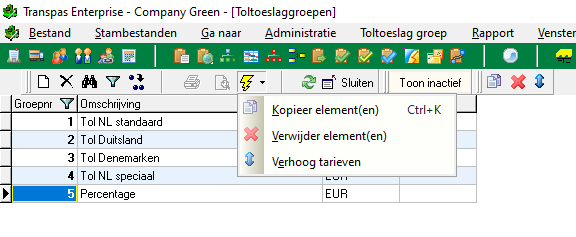
| Increase/decrease rates | Rates can easily be increased or decreased by a percentage. |
| Copy elements | This action allows one or more elements within a toll surcharge group to be copied to a new period. This eliminates the need to re-enter all underlying elements. |
¶ Alternative methods
If this approach does not fit the desired business process, Transpas also provides other options for passing on toll costs:
- Toll surcharge groups based on a percentage of the freight charge.
- Toll unit prices within a rate group.
- Surcharge rules based on a percentage of the freight charge.
- Processing through regular rate adjustments.
These options can also be used for the Dutch truck toll system. For more information about the alternative methods, see our wiki article Maut Surcharge Groups.