In Transpas is possible to 'park' a trailer.
Normally the loading and unloading of a shipment takes place in the same trip. It is possible for a trip to be comprised of multiple resourcecombinations through the use of decoupling.
But say a trip only takes place on one day and the last thing that happens is loading a shipment for the next day?
For this the tab sheet Transits was made.
¶ Putting a shipment in transit
Below a shipment has been loaded on Friday and decoupled in Groningen.
After that unloading has been dragged to the tab sheet Transits:

On the line in the tab sheet Transits it is visible that the cargo resource, trailer 220, is located in Groningen. The last tripnumber is shown, and that unnloading still needs to take place.
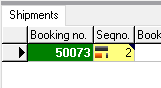
When the line is selected, you can see in the tab sheet Shipments below which shipments are in the trailer:
¶ Taking a shipment out of transit
The unloading line remains visible in the tab sheet Transits.
On Monday a planner can drag this line unto a trip:
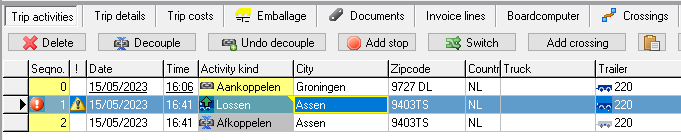
The traile will automatically be filled in on a trip.
When the shipment is dragged on a trip, Transpas will not create a couple and decouple activity.
When the shipment is placed between other trip activities, Transpas will create a couply and decouply activity.
In the image above the shipment has been dragged unto the trip.
The shipment is also visible in the Unplanned shipments, but when it is dragged unto a trip from that tab, Transpas will not automatically fill in the trailer.
What Transpas does when a trailer already has been filled in on the second trip, can be influenced through a setting in the screen Plangroups:
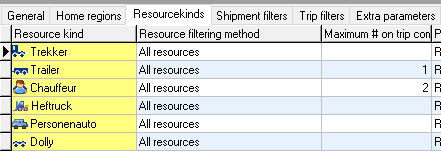
When, in the plangroup of this trip, under Maximum # on trip combination it has been set that trailers are possible on a single trip combination, Transpas will also fill the field Trailer2.
Is set that only 1 trailer can be used per trip combination, Transpas will give a warning when a planner tries to drag a shipment from Transits on a trip which already has a trailer.
¶ Information on shipments transits in a trip
Under the tab sheet Shipment transits information can be found on the shipments which are coupled or decoupled through transits.
This information is visible when the corresponding couple or decouple activity is selected:
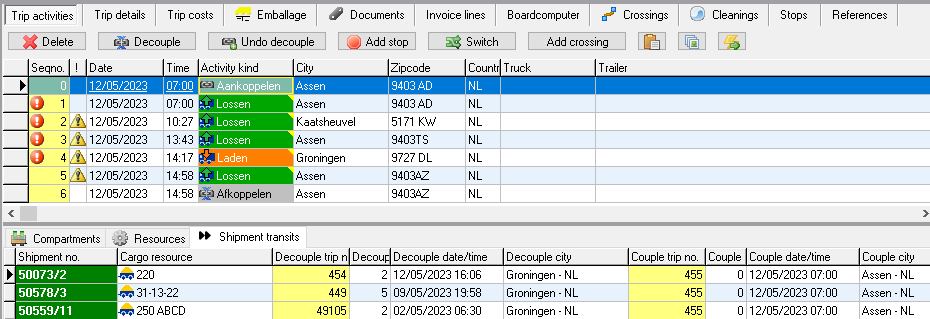
Here information on the shipments is visible.
This is trip 455. In trip 454, on the tab sheet Shipments transits, you will also see shipment 50073/2 mentioned.